Managing fixtures shouldn’t consume your valuable time. FixtureSync transforms hours of manual work into a streamlined, automated process that keeps your entire club informed and organised.
Managing fixtures shouldn’t consume your valuable time. FixtureSync transforms hours of manual work into a streamlined, automated process that keeps your entire club informed and organised.
From first launch to fully automated fixture management in four simple steps.
1
Step One
Select your Region, League and Division(s)
🏢
Screenshot: Organisation Selection
Coming soon...
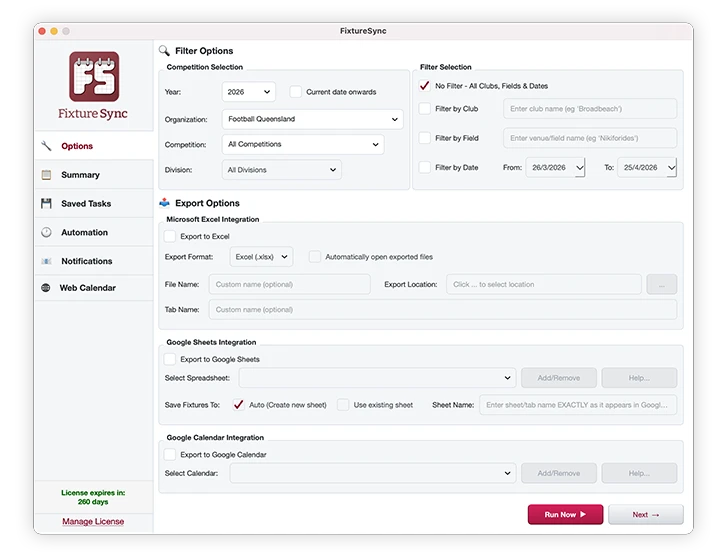
Open FixtureSync and choose one or multiple regions(s). Then select one or more league (competition) from the available options and further refine it by division if necessary.
Single or multi-region selections
Single or multi-league selections
Select your division to further refine the results
2
Step Two
Filter by Club, Venue or Date Range
Filter by Club, Venue or Date Range
🏢
Screenshot: Filter Options
Coming soon...
Narrow down your fixtures to exactly what you need. Filter by your home club to see only your team’s games, by venue for ground allocation, or by date range to focus on upcoming rounds. Show only future fixtures or include completed results with scores.
Intelligent club-level filtering
Venue filtering for ground co-ordinators
See only upcoming fixtures or full season history
3
Step Three
Export to your Chosen Format
Choose where you want your fixtures to go. Toggle on Excel, CSV, Google Calendar, Google Sheets, or any combination. Set file paths, file names, tab names or specific Sheets and Calendars.
Microsoft Excel (.xls) or .CSV for local files
Google Sheets for online spreadsheet viewing/sharing
Google Calendar for online event creation and presentation
Select any, or a combination of, export types
🏢
Screenshot: Saved Tasks
Coming soon...
4
Step Four
Save Filter and Export Configurations
🏢
Screenshot: Saved Tasks
Coming soon...
Save your filter and configuration settings as a Task which can be re-used at the click of a button, or scheduled for daily automation. Different tasks for different purposes.
5
Step Five
Schedule Daily Automation
🏢
Screenshot: Scheduled Automation
Coming soon...
Schedule a task to run daily and FixtureSync will automatically fetch the latest fixtures, update all your exports, and send you an email summary — every day without opening the application.
🏢
Screenshot: Scheduled Automation
Coming soon...
🏢
Screenshot: Email Notifications
Coming soon...
6
Step six
Setup Email Notifications
🏢
Screenshot: Email Notifications
Coming soon...
Configure automated email notifications to keep your team informed without lifting a finger. Choose between individual emails — sent immediately after each scheduled sync — or a daily digest that compiles all fixture updates from every task that day into a single summary email. Either way, results are delivered straight to your specified recipients.
FixtureSync software fetches your team’s football fixtures and can export it to Excel, Google Calendar, and Google Sheets, with options for automated daily synchronisation, at the press of a button.